Linumed Base
An Ansible-based IaC kit that turns a standard Debian 13 installation into a hardened, GDPR-aware healthcare infrastructure platform: HL7 v2 integration, monitoring, reverse proxy, and encrypted backups.
It is not a Linux distribution. There is no custom kernel, no installer image, nothing to boot. It is a collection of Ansible playbooks and roles that configure a standard Debian 13 (Trixie) server you install yourself.
It is the platform we run our own product on: everything Linumed Shifts needs underneath it - a hardened host, TLS, monitoring, encrypted backups - is what this kit installs. The perfect base for Shifts, and for whatever else you host yourself.
Version v2.2.0, six roles, stable per ADR 0008.
What it includes
| Component | Role |
|---|---|
| Debian 13 hardening | SSH, ufw, fail2ban, unattended-upgrades |
| Caddy | Reverse proxy with automatic TLS |
| BridgeLink | HL7 v2 integration engine (MPL-2.0 fork of Mirth Connect). FHIR endpoints can be built as HTTP/JSON channels; no FHIR data type ships with the engine - see FHIR, precisely |
| Prometheus, Grafana, Loki, Alertmanager | Observability stack - log shipping via Grafana Alloy, host metrics via native Node Exporter |
| restic | Encrypted backups |
Status
Every role passes a full site.yml
double-run against a throwaway VM - idempotent on the second run - and, separately,
against a real Debian 13 netinst install. That double-run runs in CI on every change
to the Ansible, Docker, test or scripts trees - documentation-only commits skip it
deliberately, the run itself takes around nine minutes against a single runner. A
second, independent systemd timer restores backups into a throwaway target weekly
and diffs the result against the live source, so a restore test is not the same
thing as a successful backup job. The test run covers site.yml checks plus a
node-baseline pass for hosts running something else on top, an executed - not just
documented - teardown, and an upgrade run from the previous tag onto the same host.
A weekly scan checks every pinned container image for known vulnerabilities, with
exceptions recorded and justified.
Equally important: the limits.
No bundled identity provider - every management interface (Grafana, Prometheus, the
BridgeLink admin UI) binds to loopback only and is reached over an SSH tunnel.
Debian 13 is the only supported target. No application software is included -
Linumed Base configures the platform underneath, not the app running on it. Most of
the kit is Compose-coupled and assumes a single host - only common,
docker and
backup are
runtime-agnostic and can run on the nodes of an existing cluster via
playbooks/node-baseline.yml.
And regardless of runtime: one host means no high availability.
System requirements
Measured, not estimated: each row is a real site.yml
(or role subset) deployment against a fresh Debian 13 VM, sized down until it still
deployed cleanly, then measured after a settle period so short-lived install-time
spikes don't inflate the number.
| Stack | RAM (allocated / used) | vCPUs | Disk (used) |
|---|---|---|---|
| common + docker + caddy | 1 GB / 381 MB | 1 | 1.6 GB |
| + monitoring | 2 GB / 903 MB | 2 | 4.6 GB |
| Full stack (+ bridgelink + backup) | 1.5 GB / 1.3 GB | 2 | 7.0 GB |
| Full stack, comfortable | 6 GB / 1.9 GB | 3 | 7.0 GB |
The four rows are not from the same measurement run, so don't compare them row to row (e.g. "Full stack" using less RAM than "+ monitoring" alone isn't a contradiction) - read each one as a floor with headroom for that stack, not as a ranked inventory.
1 vCPU is the minimum, not a recommendation, even for the smallest stack - a busy first apply (package installs, image pulls) is visibly slower on a single core. With 1 GB, the full stack fails outright - BridgeLink's JVM doesn't start. BridgeLink dominates the RAM figure once channels are added; the numbers above are an idle engine on its default 512 MB heap.
Quick start
# fresh minimal/netinst target has no git - clone here first, then copy just
# the bootstrap script over and run it on the target as root:
git clone https://github.com/Linumed/Base.git
cd Base

scp scripts/bootstrap.sh root@<target>:~
ssh root@<target> ./bootstrap.sh --user <username> --key "ssh-ed25519 AAAA... you@host"
# <username> is whatever you want the sudo-capable user to be called - has to
# match ansible_user in hosts.yml below
# root is only needed for this one command - a fresh minimal install has no sudo
# user or sudo package yet. Every step after this connects as <username>, never
# root again - the common role locks root SSH login out entirely later on.

cd ansible
# every ansible-playbook/-vault/-lint command in this repo runs from here, not the
# repo root - ansible.cfg (roles_path, default inventory) only applies from here

cp -r inventory/example inventory/<myhospital>
# <myhospital> is any name you like for this directory (a customer name, a site
# name) - not a required one, but keep using the same name once you've chosen it
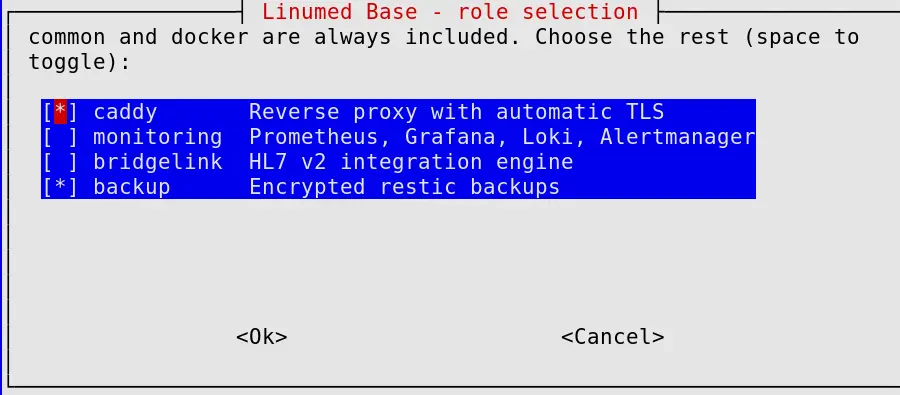
# edit inventory/<myhospital>/hosts.yml, then pick optional roles - by hand or via
# the whiptail checklist:
../scripts/select-roles.sh --file inventory/<myhospital>/group_vars/linumed/vars.yml

cp inventory/<myhospital>/group_vars/linumed/vault.yml.example \
   inventory/<myhospital>/group_vars/linumed/vault.yml
# edit vault.yml, replace every CHANGEME, then encrypt it:
ansible-vault encrypt inventory/<myhospital>/group_vars/linumed/vault.yml

ansible-playbook playbooks/site.yml -i inventory/<myhospital> --ask-vault-pass
# add --ask-become-pass unless bootstrap.sh ran with --nopasswd. Only works if
# <username> has a login password though - bootstrap.sh leaves the account
# locked by default, set one yourself first (passwd <username> as root on the target)
--ask-become-pass only works if <username> has a login
password - bootstrap.sh leaves the account locked by default, so set one
yourself first (passwd <username> as root on the target).
Design decisions
A configuration kit, not a distribution
Linumed began as a planned Debian-based distribution. One person cannot keep a distribution's promises (security updates, installer images, a support horizon), so the kit configures a stock Debian 13 instead, and Debian's security updates reach the host with nobody in between.
ADR 0012 →Why BridgeLink, not Mirth Connect
NextGen made Mirth Connect proprietary in March 2025. BridgeLink is the same codebase under an actively maintained MPL-2.0 fork with current container images, so the integration engine stays fully open source and patched.
ADR 0001 →Loopback-only access, no bundled identity provider
Every management interface binds to loopback and is reached over an SSH tunnel. No identity provider ships with the kit, deliberately - less attack surface on a system aimed at hospitals.
ADR 0003 →Docker Compose, not Kubernetes
A fixed set of services on a single host has nothing to schedule and nothing to distribute. The security model is host-level by design (see ADR 0003) and does not carry over to a cluster this kit does not own.
ADR 0007 →License
MIT - see LICENSE in the repository.
Contact
To report a security problem, use security@linumed.com - never a public issue. See SECURITY.md for details.